

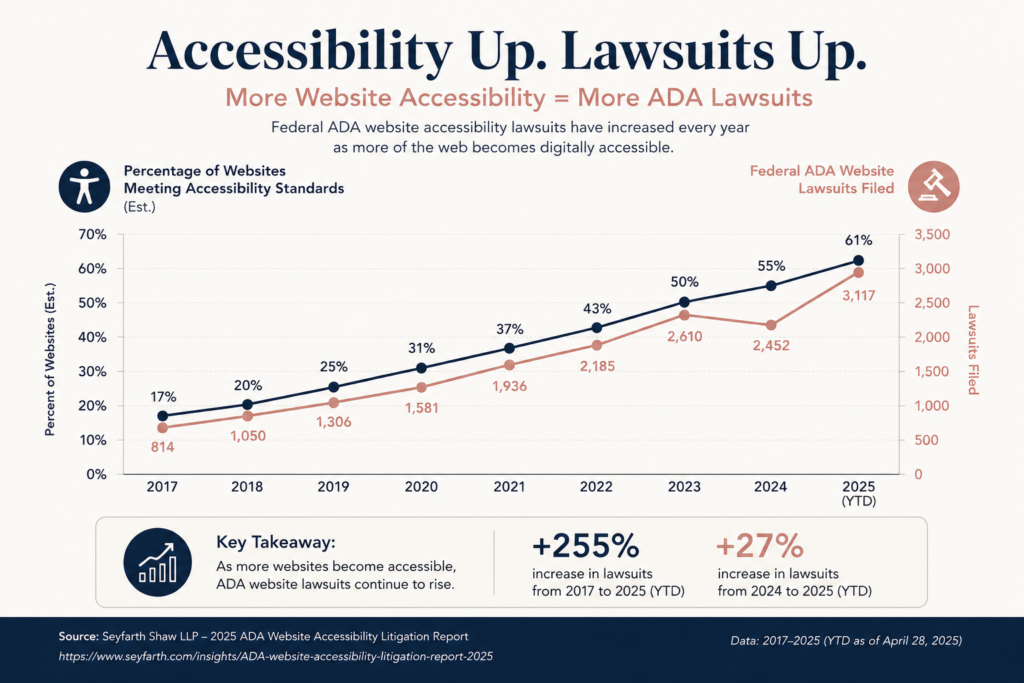
Over 5,000 web accessibility lawsuits were filed in 2025 alone, a 37 percent increase from the year before. If you think those lawsuits are targeting Fortune 500 companies, think again. Nearly two-thirds of them hit businesses with less than $25 million in annual revenue. If your business has a website and serves the public, you need to know whether that site is an ADA compliant website or a legal liability sitting on the open internet.
We work with small businesses every day, and this is one of the conversations we have most often. The good news is that compliance is achievable. Building an ADA compliant website is within reach for any business, and the work it requires makes your site better for every user, including Google. Here is what you need to know.
What Web Accessibility Actually Means
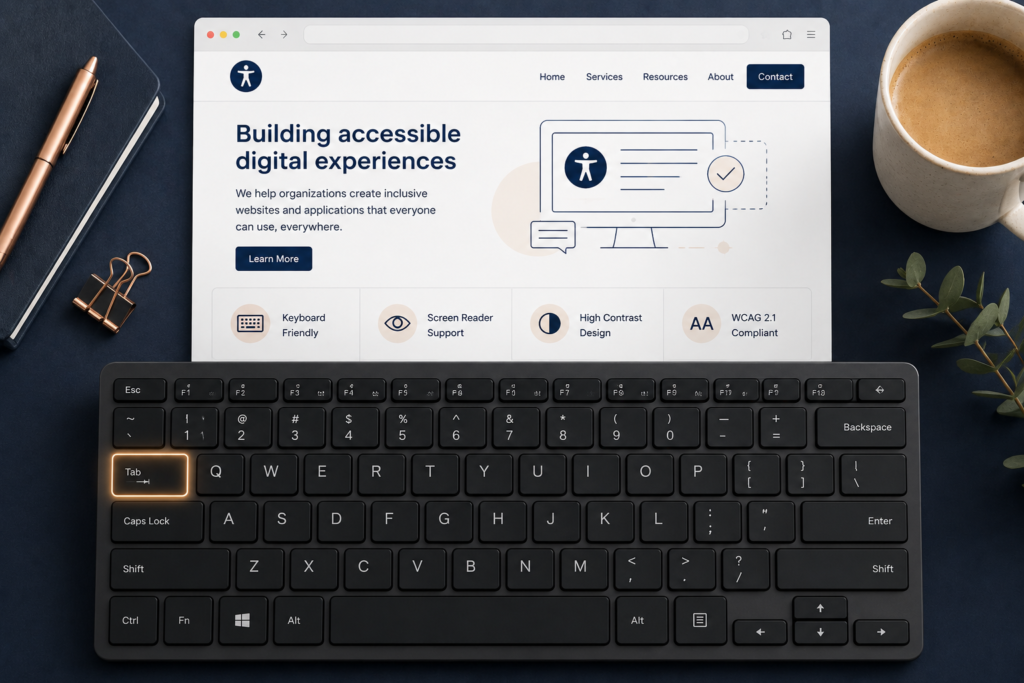
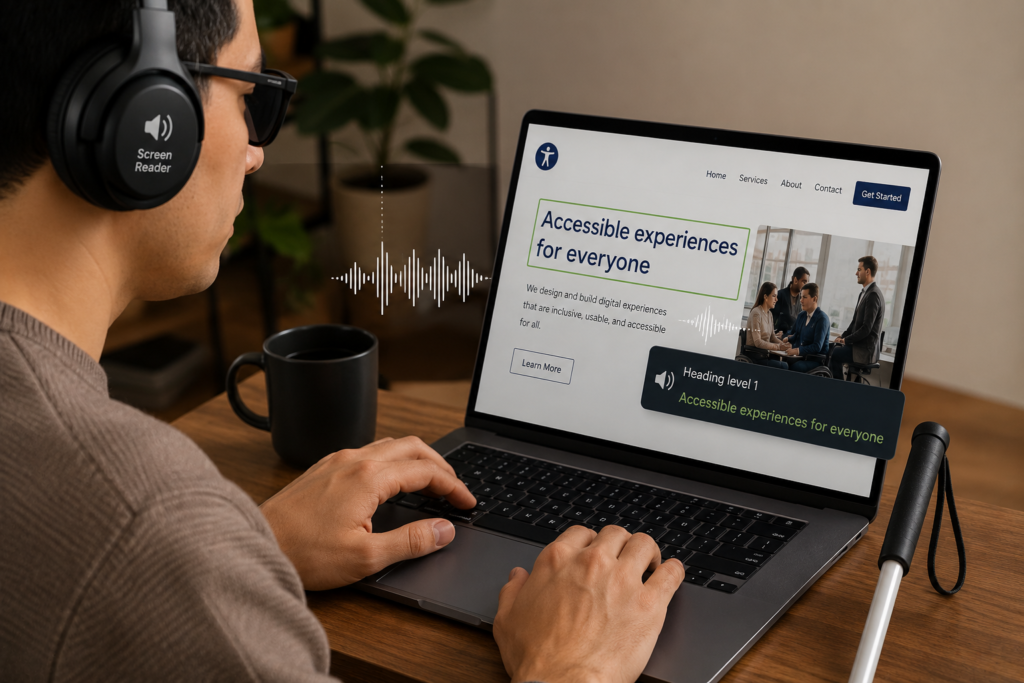
Web accessibility means building and maintaining a website that anyone can use, regardless of physical, visual, auditory, or cognitive ability. In legal terms, it means operating an ADA compliant website. That includes making sure people who navigate by keyboard, rely on screen readers, or cannot distinguish low-contrast text can access everything your site offers.
This is not just an ethics conversation. It is a technical standards conversation. And those standards have a name.
The Four POUR Principles Explained
The Web Content Accessibility Guidelines (WCAG), published by the W3C Web Accessibility Initiative, organize all accessibility requirements around four core principles. Your site must be:
Perceivable — Users must be able to see, hear, or otherwise perceive all content. This includes alt text on images, captions on video, and sufficient color contrast between text and background.
Operable — Users must be able to navigate and interact with every element of your site. If someone cannot use a mouse, they should still be able to reach every link, button, and form field using only a keyboard.
Understandable — Content and navigation must be predictable and clear. Labels on forms, descriptive error messages, and consistent navigation menus all fall into this bucket.
Robust — Your code must be clean enough that assistive technologies like screen readers can interpret it accurately. Broken HTML or poorly structured headings cause real navigation failures for real users.
WCAG 2.1 and Why Level AA Is the Standard You Need to Hit
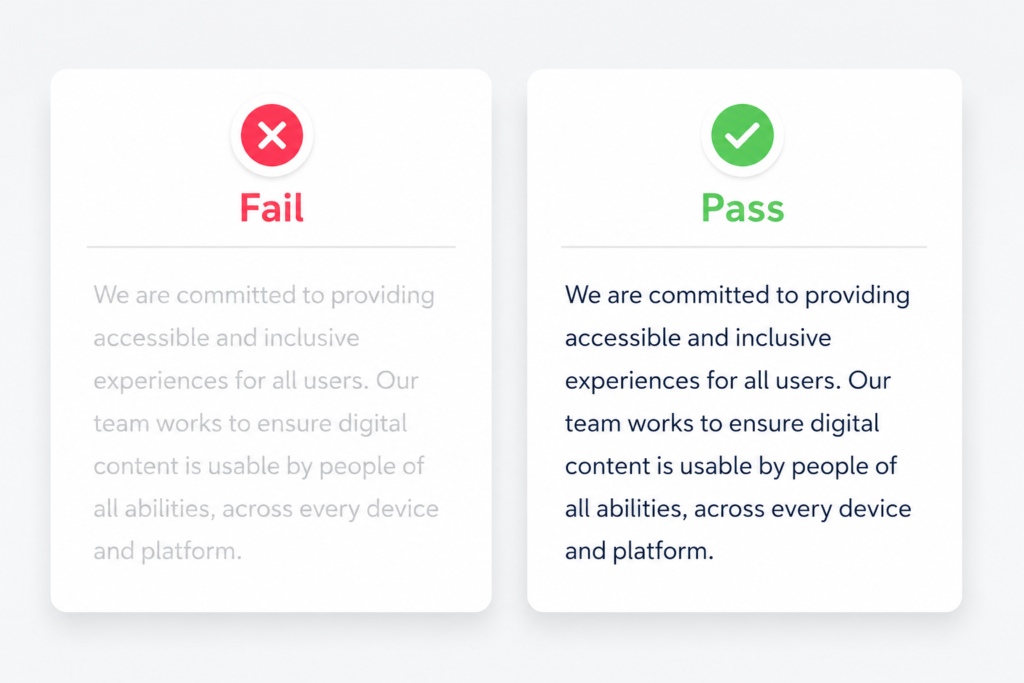
WCAG has three levels: A (minimum), AA (standard), and AAA (enhanced). Level AA is the standard referenced in most legal cases and the benchmark the DOJ adopted in its 2024 rule. It requires, among other things, a minimum 4.5:1 color contrast ratio for normal body text. Reaching Level AA is what makes an ADA compliant website legally defensible. Most websites we audit fail this test out of the box.
Who the ADA Actually Applies To (Probably You)
This is the question we hear most from small business clients, usually followed by “but we only have five employees” or “we don’t have a physical storefront.” Neither of those things exempts you from needing an ADA compliant website.
Title III and Public Accommodations
Title III of the Americans with Disabilities Act covers businesses that serve the public, which the law calls “places of public accommodation.” This category includes restaurants, retailers, service providers, gyms, hotels, professional offices, and virtually every type of business that interacts with customers. The ADA was written in 1990, before the commercial internet existed, but courts have consistently applied it to websites, which means operating an ADA compliant website is now a baseline legal expectation for most businesses.
The DOJ’s Position on Websites
The Department of Justice has maintained for years that websites operated by businesses covered under Title III must be accessible. In 2024, the DOJ reinforced this position and issued guidance at ada.gov clarifying that the ADA applies to web content and digital services. The DOJ also finalized a formal rule requiring state and local government websites to comply with WCAG 2.1 Level AA, which has been widely cited as the expected standard for private businesses as well.
Does Business Size Matter?
For Title III, no. The ADA does not carve out exemptions based on revenue or headcount. Whether you have two employees or two hundred, an ADA compliant website is not optional. What varies is the severity of risk, which we cover next.
Why ADA Website Lawsuits Are Surging and Who Is Getting Hit
The numbers are not subtle. Over 5,000 lawsuits were filed in 2025 across state and federal courts, and the trajectory is still climbing. The businesses getting hit are rarely the ones that tried to build an ADA compliant website and fell short. They are the ones who never started.
The Numbers You Need to Know
More than 2,014 federal accessibility lawsuits were filed in just the first half of 2025, a 37 percent year-over-year increase, according to UsableNet’s 2025 Digital Accessibility Lawsuit Report. E-commerce websites account for 77 percent of all cases. Average settlement costs range from $5,000 to $20,000 for smaller businesses, but legal fees and remediation costs can push the total well past that. Roughly 45 percent of companies sued in 2025 had already been sued before, which suggests that settling once without fixing the underlying problems puts you right back in the crosshairs.
Small Businesses Are the Primary Target
In 2024, 67 percent of digital accessibility lawsuits targeted companies with annual revenues under $25 million. In 2025, that number was still 64 percent. Plaintiffs and their attorneys specifically seek out smaller businesses because they are statistically more likely to settle quickly and quietly. Not having an ADA compliant website puts you directly in that pool. According to the CDC, 1 in 4 Americans lives with a disability. That is not a niche market. That is a quarter of your potential customer base.
The Widget Trap
Here is something most guides do not tell you: buying an accessibility overlay widget does not protect you from a lawsuit. In 2025, 1,416 businesses that had an accessibility widget installed were still sued for accessibility violations, up from 1,023 in 2024. The Federal Trade Commission fined one major overlay provider $1 million for making false compliance claims. These tools do not fix your underlying code. They apply a surface-level patch while the structural problems remain. An overlay does not give you an ADA compliant website. We have seen clients come to us after purchasing one and still receiving demand letters within months.
The Most Common Violations Triggering ADA Lawsuits
The violations driving most lawsuits fall into three categories. Each one represents a real barrier for users with disabilities, and each one has a fix.
Here is a breakdown of what we see most often in accessibility audits, why each one matters, and what it takes to build an ADA compliant website that holds up legally.
| Violation | What It Causes | How to Fix It |
| Missing image alt text | Screen readers skip or misread images; blind users miss content entirely | Add descriptive alt text to every non-decorative image |
| Low color contrast | Text is unreadable for low-vision users; fails WCAG 4.5:1 ratio | Use WebAIM Contrast Checker to test and adjust colors |
| No keyboard navigation | Users who cannot use a mouse are completely locked out | Ensure all menus, links, buttons, and forms are Tab-navigable |
| Missing form labels | Screen readers cannot describe what a form field is asking | Add visible, programmatic labels to every input field |
| Videos without captions | Deaf and hard-of-hearing users cannot access video content | Add accurate closed captions to all video content |
| Poor heading structure | Broken H1-H6 order destroys screen reader navigation | Use headings in logical, sequential order throughout every page |
| PDFs without tags | Untagged PDFs are inaccessible to screen readers | Export or remediate PDFs with proper tagging and reading order |
| Auto-playing media | Disorienting for users with cognitive disabilities | Remove autoplay or provide an immediate pause control |
| Non-descriptive link text | “Click here” tells a screen reader user nothing | Write descriptive link text that explains the destination |
| Missing skip navigation link | Forces keyboard users to tab through the entire header on every page | Add a “skip to content” link at the very top of each page |
Visual Accessibility Failures
Color contrast is the most commonly cited reason a site fails to qualify as an ADA compliant website. If your brand palette uses light gray text on a white background, a soft blush on cream, or any combination that has not been verified against the 4.5:1 standard, you are already failing. Low contrast does not just affect blind users; it affects the 8 percent of men and 0.5 percent of women who have some form of color vision deficiency, anyone in bright sunlight reading on a phone, and users with age-related vision decline.
Alt text is the other major visual failure on any site claiming to be an ADA compliant website. An image with no alt text is invisible to a screen reader. An image with lazy alt text like “image1.jpg” or “photo” is worse than useless. Alt text should describe what is in the image and, when relevant, what it is communicating. Decorative images should have empty alt attributes so screen readers skip them intentionally.
Navigation and Keyboard Access Failures
Close your mouse right now. Try to navigate your website using only the Tab key and the Enter key. Can you reach the menu? Can you open a dropdown? Can you submit your contact form? If any of those actions fail, you do not have an ADA compliant website for the millions of users who depend on keyboard navigation.
According to the WebAIM Screen Reader Survey, keyboard navigation is one of the top pain points reported by screen reader users. Focus indicators, which show which element is currently selected during keyboard navigation, are frequently stripped out by designers for aesthetic reasons. Removing them is one of the most common barriers we find in audits.
Forms, Media, and Content Failures
Forms are where a surprising number of accessibility violations live. A field that says “Enter your email” as placeholder text inside the field looks clean in a design mockup, but the placeholder disappears the moment a user starts typing. If there is no persistent label attached to that field, a screen reader user has no idea what they just filled in. Without proper labels, your site is not an ADA compliant website.
Video content is another area where ADA compliant website requirements catch people off guard. Captions are not just for users who are deaf or hard of hearing. They benefit users in noisy environments, non-native speakers, and users who process information better when they can read along. WCAG requires synchronized captions for all pre-recorded video. Auto-generated captions from platforms like YouTube are a starting point, but they are not reliable enough to constitute compliance on their own.
Free Tools to Audit Your ADA Compliant Website Right Now
You do not need to hire anyone to get a baseline read on where your site stands. These tools will surface the most common issues in minutes.
Run at least the first two on your homepage, your contact page, and your most important service or product page. This will tell you exactly how far your current site is from being an ADA compliant website. Automated tools catch roughly 30 to 40 percent of accessibility issues. Manual testing closes the gap.
| Tool | What It Checks | Link | Free or Paid |
| WAVE | Errors, contrast, structure, ARIA labels, form labels | wave.webaim.org | Free |
| WebAIM Contrast Checker | Color contrast ratios against WCAG 2.1 thresholds | webaim.org/resources/contrastchecker | Free |
| Google Lighthouse | Accessibility score, performance, best practices (Chrome DevTools) | Chrome DevTools (F12) | Free |
| axe DevTools | WCAG 2.1 violations with guided remediation | Chrome/Firefox extension | Free (Pro avail.) |
| OneTap (WordPress) | Overlay tool for surface fixes; use as supplement only | WordPress Plugin Directory | Free (Pro avail.) |
One note on the last tool: accessibility widgets like OneTap can assist with certain surface-level adjustments, but as we detailed above, they should not be treated as a compliance solution on their own. Use them alongside actual code remediation, not instead of it.
What an ADA Compliant Website Actually Looks Like
An ADA compliant website is not visually dull or technically complex for users. The best accessible sites are simply well-built. Clean heading structures, descriptive links, properly labeled forms, and sufficient contrast are elements of good web design regardless of compliance requirements. Accessibility and quality move together.
Structure and Navigation
Every page should have a single H1 that clearly describes the page’s topic. Heading levels (H2, H3, H4) should nest logically and never skip. Navigation menus should be reachable by keyboard, and dropdown menus should close when focus moves away. The structure of an ADA compliant website ensures that every user, regardless of how they navigate, can reach any page without getting lost.
Images, Media, and Documents
Every image that communicates information needs descriptive alt text. Decorative images should have blank alt attributes. Videos need synchronized closed captions and, for content where visuals communicate meaning not captured in the audio, audio descriptions. PDFs must be tagged, have a defined reading order, and have alt text on any images they contain.
Forms and Interactive Elements
Every input field needs a persistent label. Buttons need to describe their action. Error messages need to explain what went wrong and how to fix it, not just that something failed. Getting forms right is one of the most critical steps toward a fully ADA compliant website and one of the most commonly skipped.
Our web design and accessibility services built around getting this right from the first build, not patching it after a demand letter arrives.
The Business Case for Accessibility (Beyond Just Staying Legal)
Compliance avoidance is a legitimate reason to build an ADA compliant website, but it is also the least interesting one. The business case is stronger than most people realize.
The $13 Trillion Market You Are Ignoring
People with disabilities and their networks control an estimated $13 trillion in annual disposable income globally. In the United States alone, one in four adults has some form of disability. If your site is not an ADA compliant website, you are not just creating legal exposure. You are actively turning away a quarter of your potential market.
Accessibility Improves SEO
Search engines crawl websites the same way screen readers do: by reading your HTML, following your heading structure, and interpreting your link text. An ADA compliant website and a well-optimized site are essentially the same thing. Proper semantic markup, descriptive alt text, and clean navigation help Google index your content more completely, and companies with strong accessibility programs see 28 percent higher revenue growth than their competitors.
Conversion Rates and User Experience
Building an ADA compliant website consistently reduces friction for all users, not just those with disabilities. Clearer labels on forms mean fewer abandoned submissions. Better color contrast means more readable calls to action. Logical tab order means smoother checkout flows. One landmark case: Tesco invested the equivalent of $44,000 in accessibility improvements and saw their annual online sales reach $16 million. The ROI was not theoretical. It was direct revenue.
Quick Wins You Can Implement Today
You do not need a full site rebuild to start moving toward an ADA compliant website. These are the highest-impact changes you can make right now, and most of them do not require a developer.
Run WAVE on your homepage and fix every “error” flag before touching any “alert” flag. Errors represent WCAG failures; alerts are warnings that may or may not require action. Then check your color contrast with the WebAIM Contrast Checker. Add alt text to any image that is currently missing it. Review your contact form and make sure every field has a label that is visible and persistent.
If you use WordPress, check your theme’s keyboard navigation by pressing Tab through your homepage. Count how many keystrokes it takes to reach your primary call to action. If the answer is more than fifteen, your keyboard UX needs work.
These steps will not make your site fully compliant, but they will eliminate the most commonly cited violations and demonstrate good-faith effort, which matters in any legal conversation. When you are ready for a full audit, [LINK: Contact/Audit Page].
When It Is Time to Call a Web Accessibility Professional
Getting to a fully ADA compliant website requires more than running a scanner. Automated tools catch 30 to 40 percent of issues. Manual audits, screen reader testing, and keyboard navigation testing surface the rest. If your site has a large volume of pages, complex interactive elements, or e-commerce functionality, self-remediation has a ceiling.
We conduct full WCAG 2.1 Level AA audits, provide a prioritized remediation plan, and rebuild or repair sites with accessibility built into every layer of the code. If you have received a demand letter, we can help you respond and remediate. If you have not, we can help you make sure you never get one. Take a look at what we offer on our Services page or Contact Us for an audit.
Frequently Asked Questions About ADA Compliant Websites
Does my website need to be ADA compliant?
If your business serves the public in any capacity, it almost certainly does. Under Title III of the ADA, businesses operating as public accommodations must provide accessible services, which courts have consistently interpreted to include websites. Size and industry do not provide exemptions. The safest assumption is that the law applies to you and that your site needs to be an ADA compliant website.
What happens if my website is not ADA compliant?
You can receive a demand letter, be named in a lawsuit, and face settlement costs that typically range from $5,000 to $20,000 for small businesses, not including legal fees or the cost of rebuilding toward an ADA compliant website. Repeat violations increase exposure significantly. In 2025, 45 percent of defendants had already been sued at least once before.
What is WCAG 2.1 Level AA?
WCAG stands for Web Content Accessibility Guidelines, published by the W3C. Level AA is the standard that defines an ADA compliant website in most legal contexts. It covers color contrast ratios, keyboard navigation, video captioning, and dozens of other technical requirements that together make your site usable by everyone.
How do I know if my website is accessible?
Start with the WAVE tool at wave.webaim.org. Run it on your homepage, your contact page, and your most-visited pages. It will flag errors, contrast failures, and structural issues in seconds. Automated tools catch roughly a third of issues; a full manual audit by a professional closes the rest.
Can a small business afford to make its website accessible?
Yes. Many accessibility improvements are low-cost or no-cost: adding alt text, fixing heading structure, improving color contrast, and labeling form fields can be done without a complete rebuild. Full remediations for small business sites typically run between $5,000 and $15,000. That is a fraction of average lawsuit settlement costs, before attorney fees.
Does using an accessibility widget make my site compliant?
No. In 2025, over 1,400 businesses using accessibility widgets were still sued for ADA violations. The FTC fined one major overlay provider $1 million for misleading compliance claims. Widgets address surface appearance, not the underlying code. They can be a useful supplemental tool but are not a substitute for genuine structural accessibility.
Your Website Should Work for Everyone. Let Us Make Sure It Does.
An ADA compliant website is not a checkbox or a legal burden. It is a better-built site that serves more users, ranks better in search, and does not land you in court. The businesses getting sued right now are not necessarily the ones who ignored accessibility on purpose. They are the ones who did not know where to start.
We do this work. We audit sites, identify what is broken, and build the fixes into the code permanently. If you want to know exactly where your site stands, Contact Us or learn more about our Services page.
The law applies to your site. Your customers with disabilities deserve access. And frankly, an ADA compliant website is just a better site. There is no downside to getting this right.